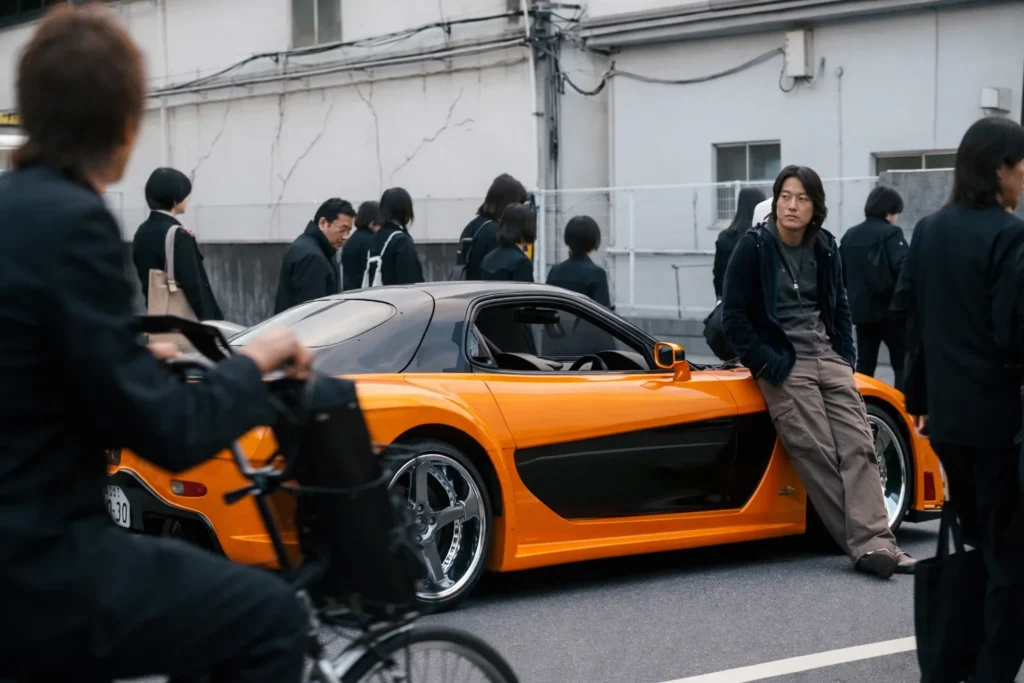
If you’ve scrolled Instagram or Reels lately, you’ve definitely seen it.
A cinematic street racing clip. Neon lights. Tokyo vibes. And suddenly… the car transforms into a completely different ride mid-scene.
That viral Fast & Furious trend is exploding right now. And yes, you can recreate it using the right tokyo drift ai prompt setup.
What Is Tokyo Drift?
Tokyo Drift is the third film in the Fast & Furious franchise, released in 2006. It introduced global audiences to Japanese drift culture a driving technique where the car intentionally oversteers while maintaining control through corners.
The film made three things iconic:
- Neon-lit Tokyo streets
- Underground car culture
- Han Lue’s calm, stylish presence
Han Lue became a fan favorite because of his cool personality and clean drifting scenes.
Fast forward to 2026, and AI creators are recreating that same cinematic vibe using advanced image and video swap tools.
What Is the Tokyo Drift Han AI Prompt Trend?
This tokyo drift ai prompt generator trend uses AI to:
- Replace a car in an image with another vehicle
- Replace a car in a video while keeping motion intact
- Maintain cinematic lighting, angle, proportions, and realism
The result looks like a Hollywood-level VFX transformation.
This is where a strong tokyo drift han ai prompt becomes crucial.
Without proper prompt structure:
- Proportions break
- Shadows mismatch
- Motion looks fake
With proper prompt engineering?
It looks seamless.
Tokyo Drift AI Prompt: How to Create a Tokyo Drift Aesthetic Edit Using AI
Below are tested structures that work consistently.
1️⃣ Image Swap Prompt (Vehicle Replacement)
Best used before creating the video.
Tokyo Drift AI Image Swap Prompt:
Replace the car in Photo 1 exactly with the vehicle from Photo 2.
Keep the exact same camera angle, lighting, depth of field, reflections, shadow direction, and cinematic style.
Match proportions perfectly.
Maintain motion blur and environment interaction.
Ultra realistic, high detail, night neon Tokyo street aesthetic.
2️⃣ Video Swap Prompt (The Viral Part)
Once your image swap looks clean, move to video.
Tokyo Drift AI Video Swap Prompt:
Replace the orange car in the video with the vehicle from the reference image.
Keep motion physics realistic.
Maintain original camera movement, speed, reflections, lighting consistency, and road interaction.
Preserve tire smoke, shadows, and perspective.
Cinematic Tokyo Drift aesthetic.
How to Make AI Video of Han in Tokyo Drift Changing the Car
Let’s break this into simple steps.
Step 1: Get Your Base Clip
Use a Tokyo Drift style drifting clip with:
- Side tracking shot
- Strong neon lighting
- Clear vehicle visibility
- Motion blur
Make sure the car is clearly visible and not heavily occluded.
Step 2: Extract a Frame
Take a high-resolution screenshot of a clean frame.
This becomes your base for the image swap.
Step 3: Run Image Swap Prompt
Use the image swap prompt above.
Goal:
Replace the original car with your new vehicle while keeping everything else untouched.
Double check:
- Wheel alignment
- Shadow angle
- Scale relative to buildings
Step 4: Run Video Swap Prompt
Now upload:
- Original video
- Your swapped vehicle reference
Use the video swap prompt.
Make sure to include:
- Motion physics
- Tire smoke retention
- Reflections
Step 5: Add Tokyo Drift Aesthetic Edit
To boost virality, enhance the vibe:
- Increase neon saturation
- Add light streaks
- Slight film grain
- Subtle cinematic LUT
This gives you that authentic tokyo drift aesthetic edit look.
Advanced Tokyo Drift AI Prompt Generator Formula
If you want to create your own custom variations, use this structure:
[Action] + [Vehicle Replacement Instruction] +
[Camera Instruction] +
[Lighting & Reflection Instruction] +
[Motion Physics Instruction] +
[Cinematic Style]
Example:
High-speed Tokyo street drift scene.
Replace the drifting Nissan with a matte black sports bike.
Keep exact side tracking angle and night neon reflections.
Preserve tire smoke interaction and realistic motion blur.
Ultra cinematic Tokyo Drift style.
This works for cars, bikes, hypercars, even fictional vehicles.
FAQs
What is a tokyo drift ai prompt?
It’s a structured instruction used in AI tools to recreate Tokyo Drift style cinematic car scenes, often involving vehicle swaps or drift edits.
Can beginners create Tokyo Drift AI videos?
Yes. If you follow the image swap + video swap workflow, even beginners can get impressive results.
Do I need coding skills?
No. Most AI tools use tokyo drift han ai prompt-based interfaces. Clear instructions matter more than technical knowledge.
Is this related to the Fast & Furious trend?
Yes. The viral car transformation trend is inspired by scenes from Tokyo Drift and the larger Fast & Furious franchise.
Final Words
The tokyo drift ai prompt trend is not just another short-form edit style. It’s a smart mix of nostalgia, cinematic storytelling, and AI precision. When you combine strong tokyo drift han ai prompt structure with realistic lighting, motion physics, and proper proportions, the result doesn’t look like a basic filter edit. It looks like a movie scene.
If you’re serious about creating viral content around the fast and furious tokyo drift ai edit, focus on three things:
- Clean source footage
- Detailed, structured prompts
- Realistic visual consistency
That’s what separates average edits from scroll-stopping content.
As AI tools continue to evolve, creators who understand tokyo drift trend prompt engineering will always stay ahead. Whether you’re using a tokyo drift ai prompt generator or crafting custom instructions manually, clarity and realism are your biggest advantages.
Now it’s your turn.
Test different swaps. Experiment with vehicles. Push the cinematic vibe.
And most importantly, create something that feels like it belongs on the big screen.
Your next viral Tokyo Drift edit might be just one tokyo drift prompt away.